

I had the challenge to install a HCL Domino V14.5 server and enabling Domino IQ. The install guide is pretty good but when using a Nvidia GPU I ran into some issues I want to share.
In the customer environment we’re using a Nvidia Tesla V100-PCIE-16GB GPU and therefore you first have to install the Nvidia CUDA Toolkit where the install guide for Linux is available here: https://docs.nvidia.com/cuda/cuda-installation-guide-linux/index.html. Please be aware of #3 and check if ALL prerequesites are given !!
So you have to download the CUDA Toolkit ( I used V13.x ) which can be downloaded on the official Nvidia site: https://developer.nvidia.com/cuda-downloads and install it.
The issues I ran in during this step was the configured size of the mountpoint “/var”. By default the customer only delivers this mountpoint with a size of 10GB which is too small for installing the CUDA Toolkit – have at least 30GB available !!!
When finished you now have to install the corresponding driver for your used GPU which you can find here: https://www.nvidia.com/en-us/drivers/. During the installation of the driver I could see that the volume size of the mount point “/opt” should have at least 15GB available to get the driver installed correctly. I installed the driver running the following commands:
sudo rpm -i nvidia-driver-local-repo-rhel9-580.95.05-1.0-1.x86_64.rpm
sudo dnf clean all
sudo dnf -y module install nvidia-driver:latest-dkms
After installing the toolkit and the driver I did a reboot and ran the following command to check if the GPU is correctly identified:
nvidia-smi
You should now receive an output similar to this one:
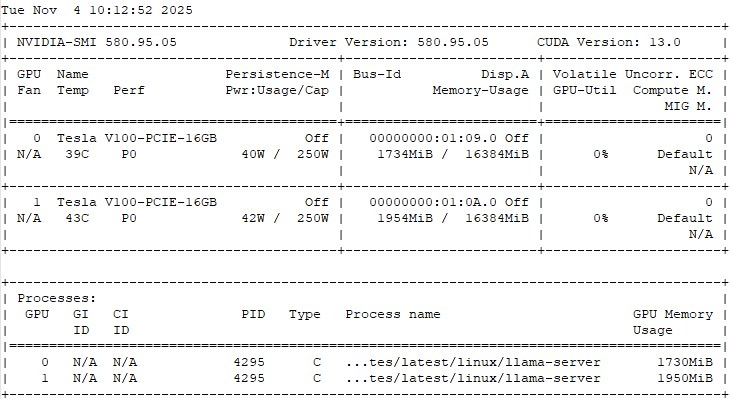
If so you now can go on and install HCL Domino 14.5 ( I also would suggest to install FP1 ) and configure your Domino IQ like mentioned in the install guide. Please don’t forget to download the updated Llama Server from My HCL Software.
 Tips and News for Collaboration solutions